---
title: Set up a Scheduled Menu Section
description: If you would like customers to only be able to order items from a menu section for a particular time you can do so in the advanced part of the Menu section edit options.
---
[Skip to content](https://help.qikserve.com/migration/knowledge/set-up-a-scheduled-menu-section#main-content)
English
Show submenu for translations
![QikServe-Access-RGB-Blue-less-padding-knowledge-base.png\]](https://help.qikserve.com/hs-fs/hubfs/QikServe-Access-RGB-Blue-less-padding-knowledge-base.png?height=40&name=QikServe-Access-RGB-Blue-less-padding-knowledge-base.png)
Open main navigation
Close main navigation
- English
Show submenu for translations
- Visit QikServe.com
Visit QikServe.com
Welcome to our Knowledge Base, do you have a question?
- There are no suggestions because the search field is empty.
1. [Knowledge Base](https://help.qikserve.com/migration/knowledge?hsLang=en)
2. [Menu Management](https://help.qikserve.com/migration/knowledge/menu-management?hsLang=en)
3. [Menu Enhancement](https://help.qikserve.com/migration/knowledge/menu-management?hsLang=en#menu-enhancement)
# Set up a Scheduled Menu Section
## If you would like customers to only be able to order items from a menu section for a particular time you can do so in the advanced part of the Menu section edit options.
The customer can be online and make the order at any time, but only **for** a particular time period that you set on the Dashboard.
Please keep in mind that items with **Restricted Ordering Hours** are visible at all times. However, if a guest attempts to order an item for a slot outside of the restricted ordering hours, they’ll receive an error: *“This item isn’t available for your chosen time.”*
Remember to include the days / hours when a section is available in the section description or the item description - otherwise your guests would have no way of knowing which collection/delivery slot they should choose for those items.
### Scheduling a menu section
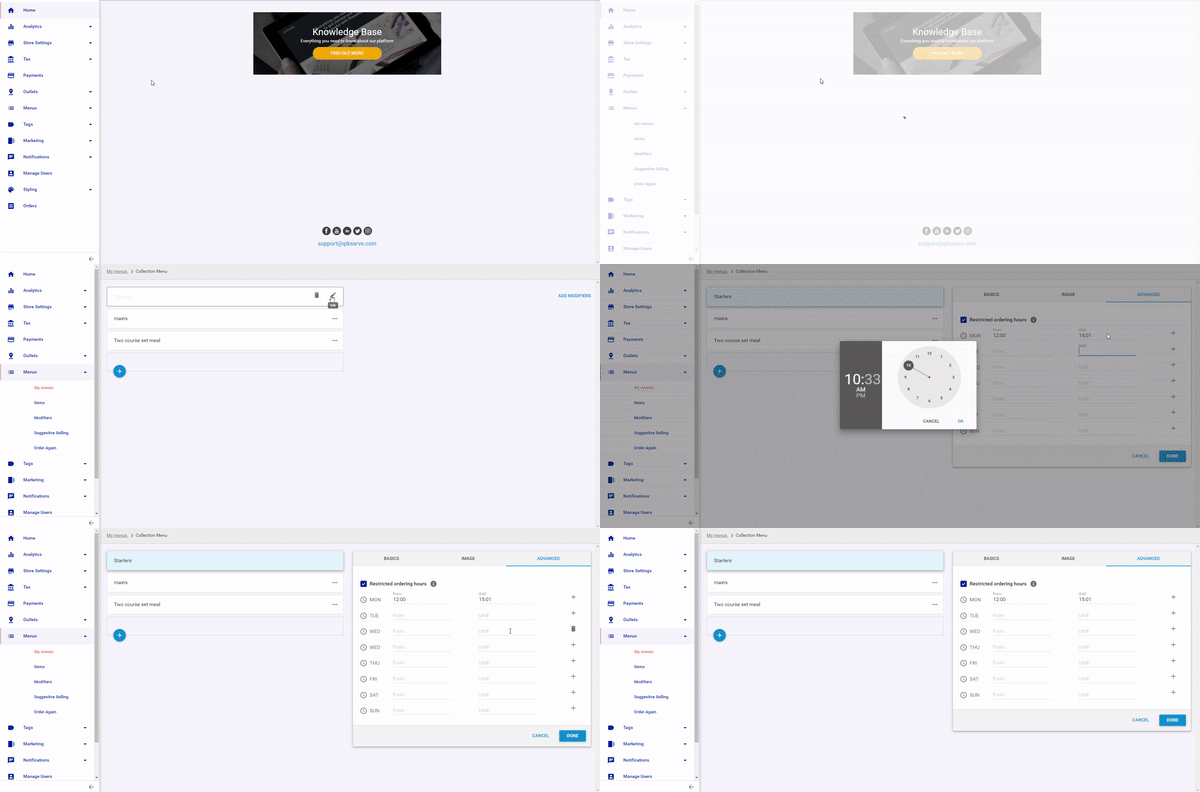
- Go to the QikServe Dashboard ([QikServe](http://manage.withqikserve.com/))
- Select '**Menus**' and then '**My menus**' on the left hand side
- Click on the relevant Menu and this will bring up a list of Menu Sections
- Scroll over the **three dots** on the right hand side of the relevant section and then click '**edit**.' Click on the 'Advanced' tab and then tick the box 'Restricted opening hours'
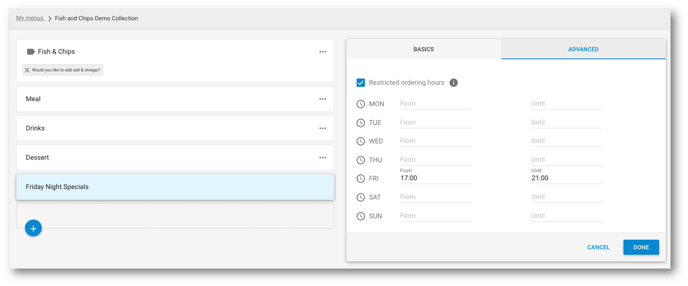
- - In the screenshot below, items from the “**Friday Night Specials**” section would only be available to order for slots on Friday, between 17:00 and 21:00
Enter (in 24 hour format) the times next to the days you want items in this particular menu section to be available for customers to order from.
- If you need to set multiple time restrictions for a section within a day, simply click the "+" symbol next to the day. This action will create an additional field for that specific day, allowing you to customize the ordering times accordingly.
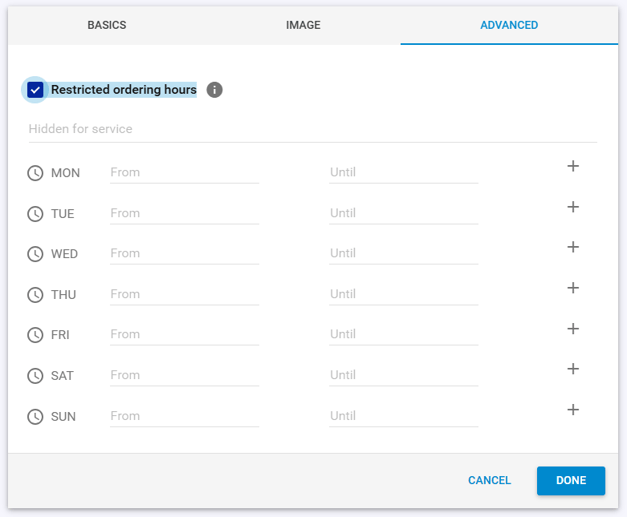
- To schedule a section for a certain service make sure to add the service you wish to have restricted under "Restricted Ordering Hours" The hours you then set will be the hours that section is shown for that service.
- Click '**Done**' to save
- Add a description to your menu section to let the customers know that items within that section are only available on certain days/times
- [Product Updates](https://help.qikserve.com/migration/knowledge/product-updates?hsLang=en#main-content)
- [2024 Updates](https://help.qikserve.com/migration/knowledge/product-updates?hsLang=en#2024-updates)
- [2023 Updates](https://help.qikserve.com/migration/knowledge/product-updates?hsLang=en#2023-updates)
- [2022 Updates](https://help.qikserve.com/migration/knowledge/product-updates?hsLang=en#2022-updates)
- [2021 Updates](https://help.qikserve.com/migration/knowledge/product-updates?hsLang=en#2021-updates)
- [Getting Started & Support](https://help.qikserve.com/migration/knowledge/getting-started-support?hsLang=en#main-content)
- [Getting Started](https://help.qikserve.com/migration/knowledge/getting-started-support?hsLang=en#getting-started)
- [How To Use Support](https://help.qikserve.com/migration/knowledge/getting-started-support?hsLang=en#how-to-use-support)
- [Order Screen](https://help.qikserve.com/migration/knowledge/getting-started-support?hsLang=en#order-screen)
- [Services](https://help.qikserve.com/migration/knowledge/services?hsLang=en#main-content)
- [Analytics](https://help.qikserve.com/migration/knowledge/services?hsLang=en#analytics)
- [Store Settings](https://help.qikserve.com/migration/knowledge/services?hsLang=en#store-settings)
- [Tax](https://help.qikserve.com/migration/knowledge/services?hsLang=en#tax)
- [Outlets](https://help.qikserve.com/migration/knowledge/services?hsLang=en#outlets)
- [Collection or Delivery Service](https://help.qikserve.com/migration/knowledge/services?hsLang=en#collection-or-delivery-service)
- [To Seat Service](https://help.qikserve.com/migration/knowledge/services?hsLang=en#to-seat-service)
- [Global Dashboard](https://help.qikserve.com/migration/knowledge/services?hsLang=en#global-dashboard)
- [Custom Legal Documents](https://help.qikserve.com/migration/knowledge/services?hsLang=en#custom-legal-documents)
- [Styling](https://help.qikserve.com/migration/knowledge/services?hsLang=en#styling)
- [Manage Users](https://help.qikserve.com/migration/knowledge/services?hsLang=en#manage-users)
- [Events Services](https://help.qikserve.com/migration/knowledge/services?hsLang=en#events-services)
- [Payments](https://help.qikserve.com/migration/knowledge/payments?hsLang=en#main-content)
- [QikServe Payments](https://help.qikserve.com/migration/knowledge/payments?hsLang=en#qikserve-payments)
- [Toggle](https://help.qikserve.com/migration/knowledge/payments?hsLang=en#toggle)
- [Pennies](https://help.qikserve.com/migration/knowledge/payments?hsLang=en#pennies)
- [Menu Management](https://help.qikserve.com/migration/knowledge/menu-management?hsLang=en#main-content)
- [Items & Modifiers](https://help.qikserve.com/migration/knowledge/menu-management?hsLang=en#items-modifiers)
- [Menu Enhancement](https://help.qikserve.com/migration/knowledge/menu-management?hsLang=en#menu-enhancement)
- [Order Management](https://help.qikserve.com/migration/knowledge/order-management?hsLang=en#main-content)
- [The Expo Screen](https://help.qikserve.com/migration/knowledge/order-management?hsLang=en#the-expo-screen)
- [Hardware](https://help.qikserve.com/migration/knowledge/order-management?hsLang=en#hardware)
- [Orderlord](https://help.qikserve.com/migration/knowledge/order-management?hsLang=en#orderlord)
- [Twillio](https://help.qikserve.com/migration/knowledge/order-management?hsLang=en#twillio)
- [Loyalty](https://help.qikserve.com/migration/knowledge/loyalty?hsLang=en#main-content)
- [Loyalty Stamp Card](https://help.qikserve.com/migration/knowledge/loyalty?hsLang=en#loyalty-stamp-card)
- [Marketing](https://help.qikserve.com/migration/knowledge/loyalty?hsLang=en#marketing)
- [Talkbox](https://help.qikserve.com/migration/knowledge/loyalty?hsLang=en#talkbox)
- [Mobile Apps](https://help.qikserve.com/migration/knowledge/mobile-apps?hsLang=en#main-content)
- [App Store Developer Account](https://help.qikserve.com/migration/knowledge/mobile-apps?hsLang=en#app-store-developer-account)
- [App Communications](https://help.qikserve.com/migration/knowledge/mobile-apps?hsLang=en#app-communications)
- [Point Of Sale Integrations](https://help.qikserve.com/migration/knowledge/point-of-sale-integrations?hsLang=en#main-content)
- [Managing your POS Integration](https://help.qikserve.com/migration/knowledge/point-of-sale-integrations?hsLang=en#managing-your-pos-integration)
- [Access/IBS POS](https://help.qikserve.com/migration/knowledge/point-of-sale-integrations?hsLang=en#access-ibs-pos)
- [Bleep POS](https://help.qikserve.com/migration/knowledge/point-of-sale-integrations?hsLang=en#bleep-pos)
- [Centegra POS](https://help.qikserve.com/migration/knowledge/point-of-sale-integrations?hsLang=en#centegra-pos)
- [Deliverect POS](https://help.qikserve.com/migration/knowledge/point-of-sale-integrations?hsLang=en#deliverect-pos)
- [Datasym POS](https://help.qikserve.com/migration/knowledge/point-of-sale-integrations?hsLang=en#datasym-pos)
- [Epos Now POS](https://help.qikserve.com/migration/knowledge/point-of-sale-integrations?hsLang=en#epos-now-pos)
- [ICR POS](https://help.qikserve.com/migration/knowledge/point-of-sale-integrations?hsLang=en#icr-pos)
- [PixelPoint POS](https://help.qikserve.com/migration/knowledge/point-of-sale-integrations?hsLang=en#pixelpoint-pos)
- [Simphony Oracle POS](https://help.qikserve.com/migration/knowledge/point-of-sale-integrations?hsLang=en#simphony-oracle-pos)
- [Syrve/IIKO POS](https://help.qikserve.com/migration/knowledge/point-of-sale-integrations?hsLang=en#syrve-iiko-pos)
- [Tevalis POS](https://help.qikserve.com/migration/knowledge/point-of-sale-integrations?hsLang=en#tevalis-pos)
- [Zonal POS](https://help.qikserve.com/migration/knowledge/point-of-sale-integrations?hsLang=en#zonal-pos)
- [Toast POS](https://help.qikserve.com/migration/knowledge/point-of-sale-integrations?hsLang=en#toast-pos)
- [Open Check](https://help.qikserve.com/migration/knowledge/open-check?hsLang=en#main-content)
- [Guest Journey](https://help.qikserve.com/migration/knowledge/open-check?hsLang=en#guest-journey)
- [Troubleshooting](https://help.qikserve.com/migration/knowledge/open-check?hsLang=en#troubleshooting)
- [Pay At Table](https://help.qikserve.com/migration/knowledge/pay-at-table?hsLang=en#main-content)
- [Guest Journey](https://help.qikserve.com/migration/knowledge/pay-at-table?hsLang=en#guest-journey)
- [Troubleshooting](https://help.qikserve.com/migration/knowledge/pay-at-table?hsLang=en#troubleshooting)
- [Kiosks](https://help.qikserve.com/migration/knowledge/kiosks?hsLang=en#main-content)
- [New Menus & Updates](https://help.qikserve.com/migration/knowledge/kiosks?hsLang=en#new-menus-updates)
- [Troubleshooting](https://help.qikserve.com/migration/knowledge/kiosks?hsLang=en#troubleshooting)
[](https://help.qikserve.com/?hsLang=en)
QikServe Ltd.
Copyright © 2026, QikServe Ltd.