---
title: Nested Modifiers
description: “Nested Modifiers” is a feature that can be enabled for your store, that allows modifiers to be assigned to other modifiers.
---
[Skip to content](https://help.qikserve.com/migration/knowledge/nested-modifiers#main-content)
English
Show submenu for translations
![QikServe-Access-RGB-Blue-less-padding-knowledge-base.png\]](https://help.qikserve.com/hs-fs/hubfs/QikServe-Access-RGB-Blue-less-padding-knowledge-base.png?height=40&name=QikServe-Access-RGB-Blue-less-padding-knowledge-base.png)
Open main navigation
Close main navigation
- English
Show submenu for translations
- Visit QikServe.com
Visit QikServe.com
Welcome to our Knowledge Base, do you have a question?
- There are no suggestions because the search field is empty.
1. [Knowledge Base](https://help.qikserve.com/migration/knowledge?hsLang=en)
2. [Menu Management](https://help.qikserve.com/migration/knowledge/menu-management?hsLang=en)
3. [Items & Modifiers](https://help.qikserve.com/migration/knowledge/menu-management?hsLang=en#items-modifiers)
# Nested Modifiers
## “Nested Modifiers” is a feature that can be enabled for your store, that allows modifiers to be assigned to other modifiers.
This allows complex setups that might not be available otherwise. Like regular modifiers, nested modifiers can provide further opportunity to up-sell, cross-sell and qualify menu items.
Examples where nested modifiers could be necessary include setting up a 2-for-1 item, meal deals or two or three course set menus/specials.
To have nested modifiers enabled for your store, please contact us at [support@qikserve.com](mailto:support@qikserve.com)
When item offers are restricted to a specific time every week, it is necessary to create a scheduled menu section. More information on how to create a scheduled menu section can be found here [Set up a scheduled menu section](https://help.qikserve.com/knowledge/set-up-a-scheduled-menu-section?hsLang=en)
### How to nest modifiers
- Create a menu section where you would like the combination deal to be shown. In this example, we have created a menu section called Two Course Set Meal
- Create a menu item that describes this combination deal. In this example, the customer has an option between 'Starter & Main' or 'Main & Dessert'
- To allow customers to choose their starter, main or dessert, create your first modifiers with the name of each course
- Add your course options to each modifier, making sure that each is set to mandatory (meaning that customers have to choose from one of the options listed)
- Now that the first modifiers have been created, you can create your nested modifiers, allowing customers to further customise their chosen orders. For example, you may wish to offer the option for customers to add toppings to their pizza or choose between a regular and gluten-free base. To do this, create a new optional modifier called ‘Add Toppings’ with the maximum selection set to the number of toppings available and additional prices added to each topping
- Drag and drop the new ‘Add Toppings’ modifier to the ‘Main’ modifier
- Apply the relevant ‘Starter’, ‘Main’ and ‘Dessert’ modifiers to the relevant menu items created in step two
### How nested modifiers appear for the customer

### Setting up a 2-for-1 item
1. Create a menu section where you would like the 2-for-1 item to be shown. In this example, we have created a scheduled menu section called Monday Buy One Get One Free
2. Create a menu item within this section called ‘Buy One Pizza Get One Free' or ‘Two Pizzas for the Price of One’ and set a price for it
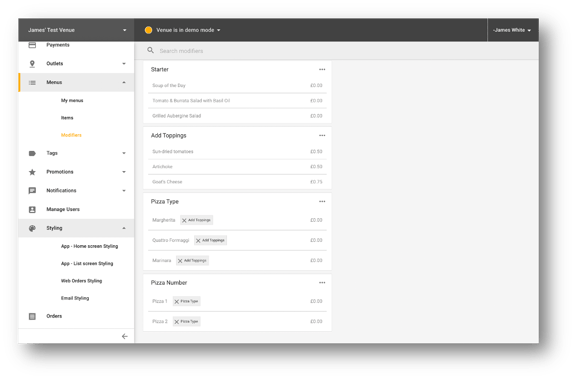
3. To allow customisation of the different pizzas as shown in the previous section, it is necessary to create modifiers. In order to distinguish how each pizza is customised, it important to create a modifier with the options ‘Pizza 1’ and ‘Pizza 2’. Make sure this modifier is set to mandatory and with a minimum and maximum selection of 2.
4. Apply this modifier to your menu item ‘Buy One Pizza Get One Free'
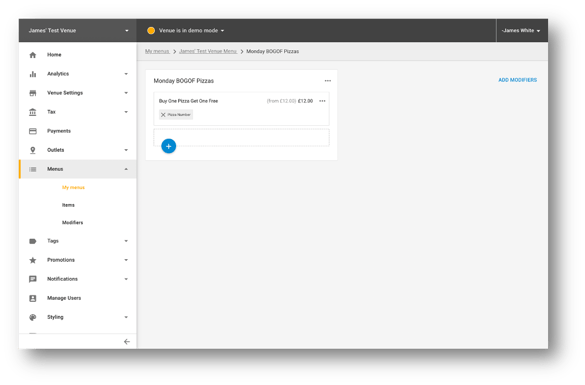
5. To allow customers to choose their type of pizza, create a second modifier called ‘Pizza Type’ or ‘Choose Pizza'. List your pizza options within the modifier, making sure that it is set to mandatory so customers have to choose one option and that the minimum and maximum selection is set to 1. Apply this modifier to ‘Pizza 1’ and ‘Pizza 2’ options
6. As explained in the previous section, from here it is possible to add up-sale options such as ‘Add Toppings’ or qualifiers such as ‘Choose Your Base’. Once these modifiers have been created apply them onto each pizza type, created in the previous step
### Tips
- It is possible to nest modifiers infinitely.
- If you have multiple modifiers with different options, it may be useful to change the internal name, indicating which item they are to be applied to. For example, if you don’t want to have the same toppings for the special deal pizzas as you do for regular pizzas, you could add ‘Two For One' in front of ‘Mains’ in the internal name of the modifier.
- [Product Updates](https://help.qikserve.com/migration/knowledge/product-updates?hsLang=en#main-content)
- [2024 Updates](https://help.qikserve.com/migration/knowledge/product-updates?hsLang=en#2024-updates)
- [2023 Updates](https://help.qikserve.com/migration/knowledge/product-updates?hsLang=en#2023-updates)
- [2022 Updates](https://help.qikserve.com/migration/knowledge/product-updates?hsLang=en#2022-updates)
- [2021 Updates](https://help.qikserve.com/migration/knowledge/product-updates?hsLang=en#2021-updates)
- [Getting Started & Support](https://help.qikserve.com/migration/knowledge/getting-started-support?hsLang=en#main-content)
- [Getting Started](https://help.qikserve.com/migration/knowledge/getting-started-support?hsLang=en#getting-started)
- [How To Use Support](https://help.qikserve.com/migration/knowledge/getting-started-support?hsLang=en#how-to-use-support)
- [Order Screen](https://help.qikserve.com/migration/knowledge/getting-started-support?hsLang=en#order-screen)
- [Services](https://help.qikserve.com/migration/knowledge/services?hsLang=en#main-content)
- [Analytics](https://help.qikserve.com/migration/knowledge/services?hsLang=en#analytics)
- [Store Settings](https://help.qikserve.com/migration/knowledge/services?hsLang=en#store-settings)
- [Tax](https://help.qikserve.com/migration/knowledge/services?hsLang=en#tax)
- [Outlets](https://help.qikserve.com/migration/knowledge/services?hsLang=en#outlets)
- [Collection or Delivery Service](https://help.qikserve.com/migration/knowledge/services?hsLang=en#collection-or-delivery-service)
- [To Seat Service](https://help.qikserve.com/migration/knowledge/services?hsLang=en#to-seat-service)
- [Global Dashboard](https://help.qikserve.com/migration/knowledge/services?hsLang=en#global-dashboard)
- [Custom Legal Documents](https://help.qikserve.com/migration/knowledge/services?hsLang=en#custom-legal-documents)
- [Styling](https://help.qikserve.com/migration/knowledge/services?hsLang=en#styling)
- [Manage Users](https://help.qikserve.com/migration/knowledge/services?hsLang=en#manage-users)
- [Events Services](https://help.qikserve.com/migration/knowledge/services?hsLang=en#events-services)
- [Payments](https://help.qikserve.com/migration/knowledge/payments?hsLang=en#main-content)
- [QikServe Payments](https://help.qikserve.com/migration/knowledge/payments?hsLang=en#qikserve-payments)
- [Toggle](https://help.qikserve.com/migration/knowledge/payments?hsLang=en#toggle)
- [Pennies](https://help.qikserve.com/migration/knowledge/payments?hsLang=en#pennies)
- [Menu Management](https://help.qikserve.com/migration/knowledge/menu-management?hsLang=en#main-content)
- [Items & Modifiers](https://help.qikserve.com/migration/knowledge/menu-management?hsLang=en#items-modifiers)
- [Menu Enhancement](https://help.qikserve.com/migration/knowledge/menu-management?hsLang=en#menu-enhancement)
- [Order Management](https://help.qikserve.com/migration/knowledge/order-management?hsLang=en#main-content)
- [The Expo Screen](https://help.qikserve.com/migration/knowledge/order-management?hsLang=en#the-expo-screen)
- [Hardware](https://help.qikserve.com/migration/knowledge/order-management?hsLang=en#hardware)
- [Orderlord](https://help.qikserve.com/migration/knowledge/order-management?hsLang=en#orderlord)
- [Twillio](https://help.qikserve.com/migration/knowledge/order-management?hsLang=en#twillio)
- [Loyalty](https://help.qikserve.com/migration/knowledge/loyalty?hsLang=en#main-content)
- [Loyalty Stamp Card](https://help.qikserve.com/migration/knowledge/loyalty?hsLang=en#loyalty-stamp-card)
- [Marketing](https://help.qikserve.com/migration/knowledge/loyalty?hsLang=en#marketing)
- [Talkbox](https://help.qikserve.com/migration/knowledge/loyalty?hsLang=en#talkbox)
- [Mobile Apps](https://help.qikserve.com/migration/knowledge/mobile-apps?hsLang=en#main-content)
- [App Store Developer Account](https://help.qikserve.com/migration/knowledge/mobile-apps?hsLang=en#app-store-developer-account)
- [App Communications](https://help.qikserve.com/migration/knowledge/mobile-apps?hsLang=en#app-communications)
- [Point Of Sale Integrations](https://help.qikserve.com/migration/knowledge/point-of-sale-integrations?hsLang=en#main-content)
- [Managing your POS Integration](https://help.qikserve.com/migration/knowledge/point-of-sale-integrations?hsLang=en#managing-your-pos-integration)
- [Access/IBS POS](https://help.qikserve.com/migration/knowledge/point-of-sale-integrations?hsLang=en#access-ibs-pos)
- [Bleep POS](https://help.qikserve.com/migration/knowledge/point-of-sale-integrations?hsLang=en#bleep-pos)
- [Centegra POS](https://help.qikserve.com/migration/knowledge/point-of-sale-integrations?hsLang=en#centegra-pos)
- [Deliverect POS](https://help.qikserve.com/migration/knowledge/point-of-sale-integrations?hsLang=en#deliverect-pos)
- [Datasym POS](https://help.qikserve.com/migration/knowledge/point-of-sale-integrations?hsLang=en#datasym-pos)
- [Epos Now POS](https://help.qikserve.com/migration/knowledge/point-of-sale-integrations?hsLang=en#epos-now-pos)
- [ICR POS](https://help.qikserve.com/migration/knowledge/point-of-sale-integrations?hsLang=en#icr-pos)
- [PixelPoint POS](https://help.qikserve.com/migration/knowledge/point-of-sale-integrations?hsLang=en#pixelpoint-pos)
- [Simphony Oracle POS](https://help.qikserve.com/migration/knowledge/point-of-sale-integrations?hsLang=en#simphony-oracle-pos)
- [Syrve/IIKO POS](https://help.qikserve.com/migration/knowledge/point-of-sale-integrations?hsLang=en#syrve-iiko-pos)
- [Tevalis POS](https://help.qikserve.com/migration/knowledge/point-of-sale-integrations?hsLang=en#tevalis-pos)
- [Zonal POS](https://help.qikserve.com/migration/knowledge/point-of-sale-integrations?hsLang=en#zonal-pos)
- [Toast POS](https://help.qikserve.com/migration/knowledge/point-of-sale-integrations?hsLang=en#toast-pos)
- [Open Check](https://help.qikserve.com/migration/knowledge/open-check?hsLang=en#main-content)
- [Guest Journey](https://help.qikserve.com/migration/knowledge/open-check?hsLang=en#guest-journey)
- [Troubleshooting](https://help.qikserve.com/migration/knowledge/open-check?hsLang=en#troubleshooting)
- [Pay At Table](https://help.qikserve.com/migration/knowledge/pay-at-table?hsLang=en#main-content)
- [Guest Journey](https://help.qikserve.com/migration/knowledge/pay-at-table?hsLang=en#guest-journey)
- [Troubleshooting](https://help.qikserve.com/migration/knowledge/pay-at-table?hsLang=en#troubleshooting)
- [Kiosks](https://help.qikserve.com/migration/knowledge/kiosks?hsLang=en#main-content)
- [New Menus & Updates](https://help.qikserve.com/migration/knowledge/kiosks?hsLang=en#new-menus-updates)
- [Troubleshooting](https://help.qikserve.com/migration/knowledge/kiosks?hsLang=en#troubleshooting)
[](https://help.qikserve.com/?hsLang=en)
QikServe Ltd.
Copyright © 2026, QikServe Ltd.
```json
{
"@context" : "https://schema.org",
"@type" : "VideoObject",
"contentUrl" : "https://3373248.fs1.hubspotusercontent-na1.net/hubfs/3373248/Nested%20modifiers.mp4",
"dateModified" : "2023-09-14T15:08:58.641Z",
"duration" : "PT43S",
"height" : 1068,
"name" : "Nested modifiers",
"thumbnailUrl" : "https://api-na1.hubapi.com/filemanager/api/v3/files/thumbnail-redirect/108249754748?portalId=3373248&size=medium",
"uploadDate" : "2023-03-27T13:28:00.694Z",
"width" : 1920
}
```
```json
{
"@context" : "https://schema.org",
"@type" : "VideoObject",
"contentUrl" : "https://3373248.fs1.hubspotusercontent-na1.net/hubfs/3373248/Nested%20modifiers%20customer.mp4",
"dateModified" : "2023-03-27T13:33:03.664Z",
"duration" : "PT17S",
"height" : 1080,
"name" : "Nested modifiers customer",
"thumbnailUrl" : "https://api-na1.hubapi.com/filemanager/api/v3/files/thumbnail-redirect/108249697407?portalId=3373248&size=medium",
"uploadDate" : "2023-03-27T13:32:56.968Z",
"width" : 530
}
```