---
title: Kiosk - Troubleshooting
description: In this article we will explain the most common troubleshooting questions and answers for first level support. Remote access to the kiosk is required.
---
[Skip to content](https://help.qikserve.com/migration/knowledge/kiosk-troubleshooting#main-content)
English
Show submenu for translations
![QikServe-Access-RGB-Blue-less-padding-knowledge-base.png\]](https://help.qikserve.com/hs-fs/hubfs/QikServe-Access-RGB-Blue-less-padding-knowledge-base.png?height=40&name=QikServe-Access-RGB-Blue-less-padding-knowledge-base.png)
Open main navigation
Close main navigation
- English
Show submenu for translations
- Visit QikServe.com
Visit QikServe.com
Welcome to our Knowledge Base, do you have a question?
- There are no suggestions because the search field is empty.
1. [Knowledge Base](https://help.qikserve.com/migration/knowledge?hsLang=en)
2. [Kiosks](https://help.qikserve.com/migration/knowledge/kiosks?hsLang=en)
3. [Troubleshooting](https://help.qikserve.com/migration/knowledge/kiosks?hsLang=en#troubleshooting)
# Kiosk - Troubleshooting
## In this article we will explain the most common troubleshooting questions and answers for first level support. Remote access to the kiosk is required.
### Troubleshooting Table
| **Issue** | **Cause** | **Fix** |
| --- | --- | --- |
| **“Kiosk Currently Unavailable” message showing** | Issue connecting POS to our service | - Ensure the POS is connected to the internet. The kiosk should become active when the QikServe servers can be reached - Hard reboot of the kiosk, deleting the cache. See steps below |
| **Kiosk images and attract screens not loading** | Issue downloading assets from our servers | - Sign in as kiosk admin - Navigate to: C:\\QikServe - Delete cache and shadow cache - Reboot the kiosk - see detailed steps below |
| **Kiosk is rebooting to Windows sign in** | Auto logon is not working | - Sign in as kiosk admin - Navigate to: C:\\QikServe\\programs\\sysinternals-auto-login - Run Autologon.exe - Enter the 'KioskUser' username and password and press enable - Do this twice to ensure it works - Reboot the kiosk to validate it now works as expected. |
| **Issues connecting to the kiosk, and kiosk not loading cache or shadow cache** | Disk space full | - Sign in as kiosk admin - Navigate to: File explorer>This PC - Check disk space - Empty recycle bin - For Lane3000 PED: Delete the oldest DMP logs **leaving recent ones:** C:\\ProgramData\\FreedomPay\\Freeway Commerce Connect\\dmp |
| **Errors with individual items** | Incorrect configuration of products, or menus not aligned | - If you manage your own menu on the QikServe Dashboard: - Check the external ID of the item that is erroring against what you have in the POS - Check that the dashboard menu and kiosk menu is aligned. Push the menu from the dashboard to the kiosk via 'Update External Menus' to be sure - Write to QikServe Support with the item that is erroring, with the item name, price and PLU for reference |
| **Printers not working** | Various | - Verify that the printer is powered on and has the correct paper loaded - Contact support@QikServe.com |
| **Payments not working** | Various | - Verify that the PED is connected to the kiosk terminal - Contact support@QikServe.com |
### **First Level Support**
#### **Navigation**
The kiosks are all Windows OS devices and have two user profiles, Kiosk User and Kiosk Admin. The kiosks are set to boot into ‘Kiosk User’ and load the QikServe app automatically.
All of the remote management platforms have various tools like reboot and an option to ‘Send Ctrl, Alt, Del’ in their toolbars which will allow you to switch users to the 'Kiosk Admin' user profile. The image below is from Teamviewer, our preferred remote access tool.
.png?width=688&height=60&name=MicrosoftTeams-image%20(13).png)
All of the kiosks have the same base file structure so you will always find the cache, and shadow cache at the following file path 'C:\\QikServe '. The cache and shadow cache are loaded from the QikServe servers periodically throughout the day.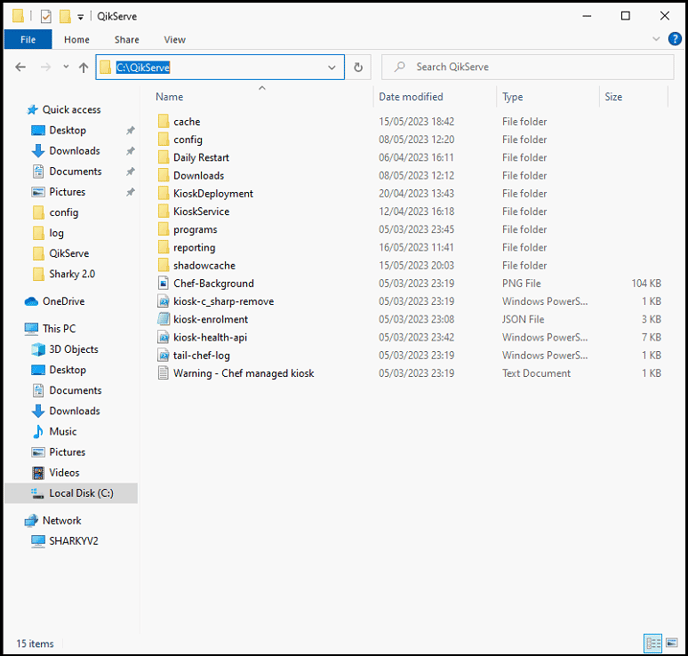
#### How to reboot a kiosk
When rebooting a kiosk it is always recommended to delete the **cache** and **shadow cache** files on the device and then restart it.
This is easiest to do when logged in to the kiosk remotely via TeamViewer, as to do it face to face with the kiosk you will need a keyboard attached.
Note that the kiosk will reboot and come online before the PED, so wait roughly 4-5 minutes to know if your kiosk is functional again. Once you reboot you do not have to do anything but wait.
If you still experience the issue then please log a ticket with [support@QikServe.com](mailto:support@qikserve.com). See below for what information to provide.
**Via TeamViewer**
1. Click “Files & Extras” > “Open file transfer”
The ‘File’ and ‘Extras’ menu may be split on your version of Teamviewer. If that is the case then ‘File Transfer’ will be in ‘File’
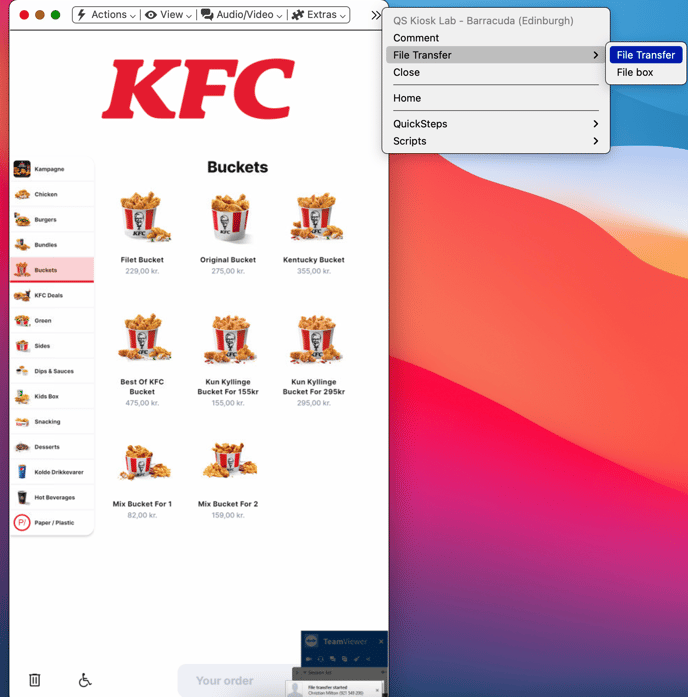
2. Navigate to C:\\QikServe in the address field on the right hand side and click enter, or click on the folders ‘C:’ and then ‘QikServe’
Select both the “cache” and “shadowcache” folder if listed - it may only be the cache folder is there
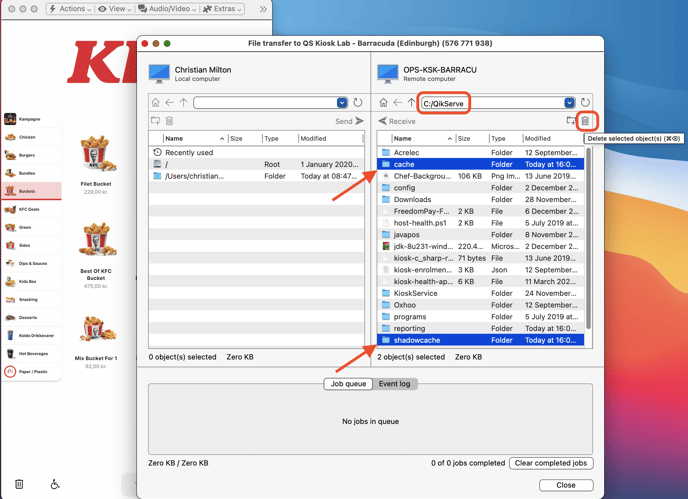
3. Delete these two folders via the small bin icon
4. Click ‘Actions' > 'Remote Reboot’ > 'Reboot' 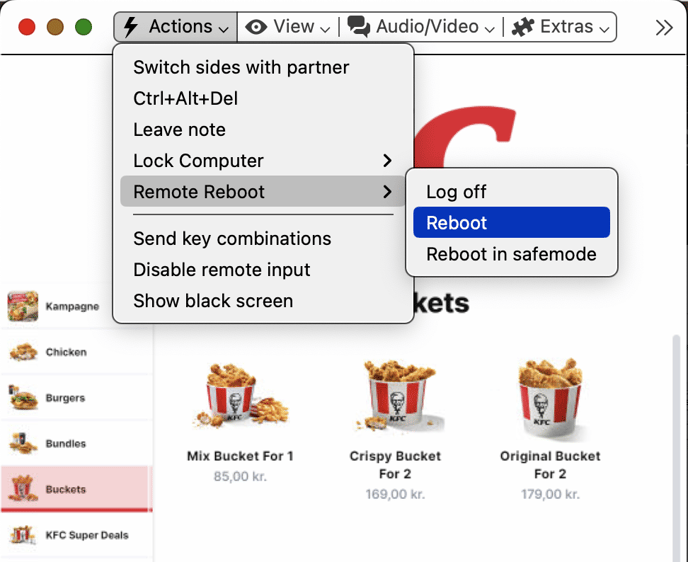
5. Restart the kiosk and wait 5 minutes to see if the issue has been fixed. If your issue is payment related then run a test payment.
#### **Windows Services**
You can check that background services are running from within Task Manager by pressing Ctrl,Alt,Del, or using the remote access toolbar. Some key services to check are running are:
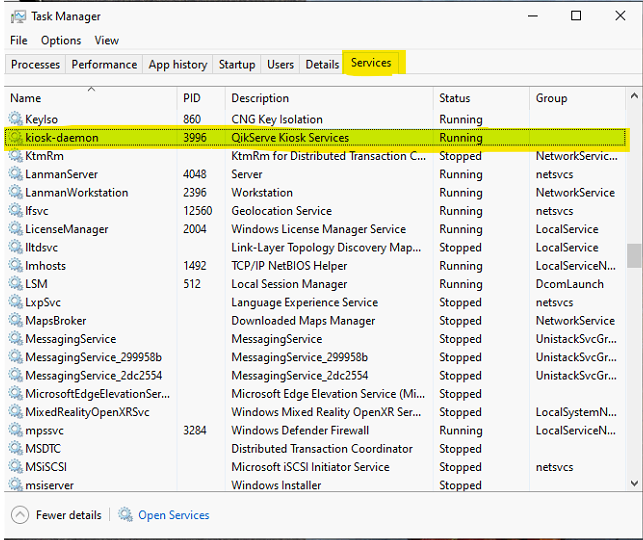
- Kiosk-daemon - QikServe kiosk service
- FCC Server - Freedompay
- FCC Client - Freedompay
- IPCservice - Worldpay
- Nxlog - Ensures we are logging to Datadog
- CouchbaseServer - Payment Database
### Contacting QikServe Support
Please get in touch with the [QikServe support](mailto:support@qikserve.com) when these first-level troubleshooting steps fail to resolve an issue, being sure to include:
- Timestamps
- Kiosk number (can be found bottom right of the attract screen)
- The steps you have taken so far to replicate and fix the issue
- Screenshots if appropriate
- [Product Updates](https://help.qikserve.com/migration/knowledge/product-updates?hsLang=en#main-content)
- [2024 Updates](https://help.qikserve.com/migration/knowledge/product-updates?hsLang=en#2024-updates)
- [2023 Updates](https://help.qikserve.com/migration/knowledge/product-updates?hsLang=en#2023-updates)
- [2022 Updates](https://help.qikserve.com/migration/knowledge/product-updates?hsLang=en#2022-updates)
- [2021 Updates](https://help.qikserve.com/migration/knowledge/product-updates?hsLang=en#2021-updates)
- [Getting Started & Support](https://help.qikserve.com/migration/knowledge/getting-started-support?hsLang=en#main-content)
- [Getting Started](https://help.qikserve.com/migration/knowledge/getting-started-support?hsLang=en#getting-started)
- [How To Use Support](https://help.qikserve.com/migration/knowledge/getting-started-support?hsLang=en#how-to-use-support)
- [Order Screen](https://help.qikserve.com/migration/knowledge/getting-started-support?hsLang=en#order-screen)
- [Services](https://help.qikserve.com/migration/knowledge/services?hsLang=en#main-content)
- [Analytics](https://help.qikserve.com/migration/knowledge/services?hsLang=en#analytics)
- [Store Settings](https://help.qikserve.com/migration/knowledge/services?hsLang=en#store-settings)
- [Tax](https://help.qikserve.com/migration/knowledge/services?hsLang=en#tax)
- [Outlets](https://help.qikserve.com/migration/knowledge/services?hsLang=en#outlets)
- [Collection or Delivery Service](https://help.qikserve.com/migration/knowledge/services?hsLang=en#collection-or-delivery-service)
- [To Seat Service](https://help.qikserve.com/migration/knowledge/services?hsLang=en#to-seat-service)
- [Global Dashboard](https://help.qikserve.com/migration/knowledge/services?hsLang=en#global-dashboard)
- [Custom Legal Documents](https://help.qikserve.com/migration/knowledge/services?hsLang=en#custom-legal-documents)
- [Styling](https://help.qikserve.com/migration/knowledge/services?hsLang=en#styling)
- [Manage Users](https://help.qikserve.com/migration/knowledge/services?hsLang=en#manage-users)
- [Events Services](https://help.qikserve.com/migration/knowledge/services?hsLang=en#events-services)
- [Payments](https://help.qikserve.com/migration/knowledge/payments?hsLang=en#main-content)
- [QikServe Payments](https://help.qikserve.com/migration/knowledge/payments?hsLang=en#qikserve-payments)
- [Toggle](https://help.qikserve.com/migration/knowledge/payments?hsLang=en#toggle)
- [Pennies](https://help.qikserve.com/migration/knowledge/payments?hsLang=en#pennies)
- [Menu Management](https://help.qikserve.com/migration/knowledge/menu-management?hsLang=en#main-content)
- [Items & Modifiers](https://help.qikserve.com/migration/knowledge/menu-management?hsLang=en#items-modifiers)
- [Menu Enhancement](https://help.qikserve.com/migration/knowledge/menu-management?hsLang=en#menu-enhancement)
- [Order Management](https://help.qikserve.com/migration/knowledge/order-management?hsLang=en#main-content)
- [The Expo Screen](https://help.qikserve.com/migration/knowledge/order-management?hsLang=en#the-expo-screen)
- [Hardware](https://help.qikserve.com/migration/knowledge/order-management?hsLang=en#hardware)
- [Orderlord](https://help.qikserve.com/migration/knowledge/order-management?hsLang=en#orderlord)
- [Twillio](https://help.qikserve.com/migration/knowledge/order-management?hsLang=en#twillio)
- [Loyalty](https://help.qikserve.com/migration/knowledge/loyalty?hsLang=en#main-content)
- [Loyalty Stamp Card](https://help.qikserve.com/migration/knowledge/loyalty?hsLang=en#loyalty-stamp-card)
- [Marketing](https://help.qikserve.com/migration/knowledge/loyalty?hsLang=en#marketing)
- [Talkbox](https://help.qikserve.com/migration/knowledge/loyalty?hsLang=en#talkbox)
- [Mobile Apps](https://help.qikserve.com/migration/knowledge/mobile-apps?hsLang=en#main-content)
- [App Store Developer Account](https://help.qikserve.com/migration/knowledge/mobile-apps?hsLang=en#app-store-developer-account)
- [App Communications](https://help.qikserve.com/migration/knowledge/mobile-apps?hsLang=en#app-communications)
- [Point Of Sale Integrations](https://help.qikserve.com/migration/knowledge/point-of-sale-integrations?hsLang=en#main-content)
- [Managing your POS Integration](https://help.qikserve.com/migration/knowledge/point-of-sale-integrations?hsLang=en#managing-your-pos-integration)
- [Access/IBS POS](https://help.qikserve.com/migration/knowledge/point-of-sale-integrations?hsLang=en#access-ibs-pos)
- [Bleep POS](https://help.qikserve.com/migration/knowledge/point-of-sale-integrations?hsLang=en#bleep-pos)
- [Centegra POS](https://help.qikserve.com/migration/knowledge/point-of-sale-integrations?hsLang=en#centegra-pos)
- [Deliverect POS](https://help.qikserve.com/migration/knowledge/point-of-sale-integrations?hsLang=en#deliverect-pos)
- [Datasym POS](https://help.qikserve.com/migration/knowledge/point-of-sale-integrations?hsLang=en#datasym-pos)
- [Epos Now POS](https://help.qikserve.com/migration/knowledge/point-of-sale-integrations?hsLang=en#epos-now-pos)
- [ICR POS](https://help.qikserve.com/migration/knowledge/point-of-sale-integrations?hsLang=en#icr-pos)
- [PixelPoint POS](https://help.qikserve.com/migration/knowledge/point-of-sale-integrations?hsLang=en#pixelpoint-pos)
- [Simphony Oracle POS](https://help.qikserve.com/migration/knowledge/point-of-sale-integrations?hsLang=en#simphony-oracle-pos)
- [Syrve/IIKO POS](https://help.qikserve.com/migration/knowledge/point-of-sale-integrations?hsLang=en#syrve-iiko-pos)
- [Tevalis POS](https://help.qikserve.com/migration/knowledge/point-of-sale-integrations?hsLang=en#tevalis-pos)
- [Zonal POS](https://help.qikserve.com/migration/knowledge/point-of-sale-integrations?hsLang=en#zonal-pos)
- [Toast POS](https://help.qikserve.com/migration/knowledge/point-of-sale-integrations?hsLang=en#toast-pos)
- [Open Check](https://help.qikserve.com/migration/knowledge/open-check?hsLang=en#main-content)
- [Guest Journey](https://help.qikserve.com/migration/knowledge/open-check?hsLang=en#guest-journey)
- [Troubleshooting](https://help.qikserve.com/migration/knowledge/open-check?hsLang=en#troubleshooting)
- [Pay At Table](https://help.qikserve.com/migration/knowledge/pay-at-table?hsLang=en#main-content)
- [Guest Journey](https://help.qikserve.com/migration/knowledge/pay-at-table?hsLang=en#guest-journey)
- [Troubleshooting](https://help.qikserve.com/migration/knowledge/pay-at-table?hsLang=en#troubleshooting)
- [Kiosks](https://help.qikserve.com/migration/knowledge/kiosks?hsLang=en#main-content)
- [New Menus & Updates](https://help.qikserve.com/migration/knowledge/kiosks?hsLang=en#new-menus-updates)
- [Troubleshooting](https://help.qikserve.com/migration/knowledge/kiosks?hsLang=en#troubleshooting)
[](https://help.qikserve.com/?hsLang=en)
QikServe Ltd.
Copyright © 2026, QikServe Ltd.