---
title: Set up Collection Slots for Events
description: In order to create an event you need to create the Collection Slots that you want customers to be able to choose from when making their order
---
[Skip to content](https://help.qikserve.com/migration/knowledge/collection-slots#main-content)
English
Show submenu for translations
![QikServe-Access-RGB-Blue-less-padding-knowledge-base.png\]](https://help.qikserve.com/hs-fs/hubfs/QikServe-Access-RGB-Blue-less-padding-knowledge-base.png?height=40&name=QikServe-Access-RGB-Blue-less-padding-knowledge-base.png)
Open main navigation
Close main navigation
- English
Show submenu for translations
- Visit QikServe.com
Visit QikServe.com
Welcome to our Knowledge Base, do you have a question?
- There are no suggestions because the search field is empty.
1. [Knowledge Base](https://help.qikserve.com/migration/knowledge?hsLang=en)
2. [Services](https://help.qikserve.com/migration/knowledge/services?hsLang=en)
3. [Events Services](https://help.qikserve.com/migration/knowledge/services?hsLang=en#events-services)
# Set up Collection Slots for Events
## In order to create an event you need to create the Collection Slots that you want customers to be able to choose from when making their order
This is one of the key differences between regular and event stores, regular stores don’t have the ability to create customised time periods.
Examples of different Collection Slots might be Pre Show/Pre Match, Interval/Half Time, After Show, which all signify time periods in relation to the start of the event. You might also have **ASAP** which is continuous throughout the event.
For each collection slot you have the ability to include a cut-off time for ordering. For a **Pre-Show** collection slot you may wish to stop a customer ordering 5 minutes before the event start time, or for the **Interval** this could be 1 minute before the event start time. This discourages customers from using their phones in a theatre for example.
Once the collection slots are all set, then you can create the event and reuse these slots for other events that you make in the future.
#### Collection Slots
- Navigate to your QikServe dashboard at [QikServe](http://manage.withqikserve.com/)
- From the menu on the left hand side select **Events > Collection Slots**
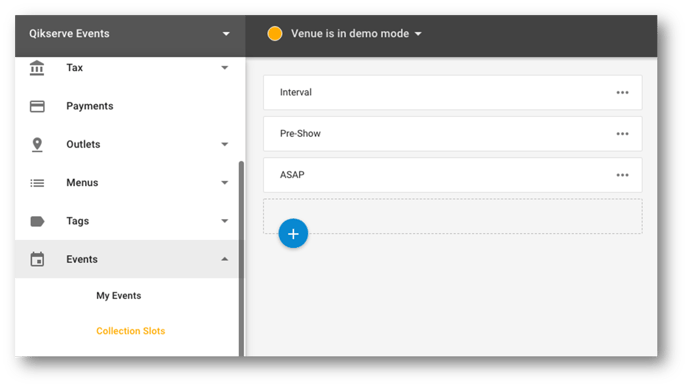
- Click the circular blue + sign to create a new Collection Slot
- Each Collection Slot needs:
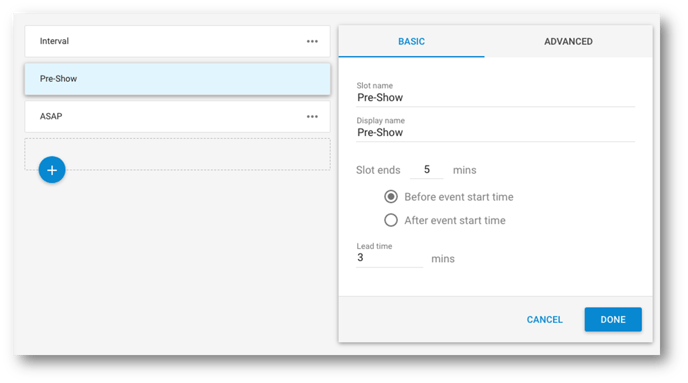
- **Basic Tab**
- A Slot name and a Display name - this is the internal and customer facing names
- If you would like the slot to have a cut off time, either for when they are able to complete an order or for when the slot is going to end, then you can set this up via the slot end \_\_\_ mins section.
- Lead time is the amount of time that it takes to make and deliver the order
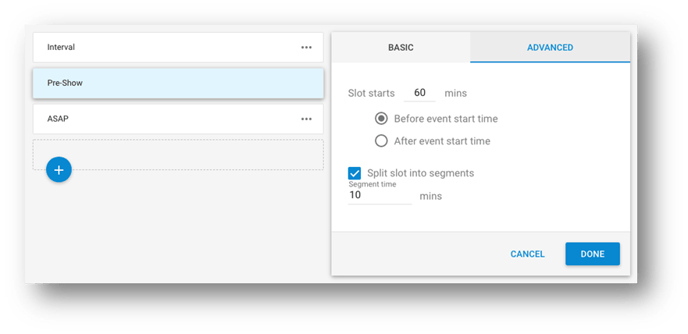
- Advanced Tab
- Indicate a Slot start time if required
- And if you want to provide segments for a Pre event slot then you can set this up here.
Please note you shouldn’t split a slot into segments if you are creating an Interval type slot
- Continue onto the next article to assign these collection slots to a new event: [Create a new Event](https://help.qikserve.com/knowledge/create-a-new-event?hsLang=en)
- [Product Updates](https://help.qikserve.com/migration/knowledge/product-updates?hsLang=en#main-content)
- [2024 Updates](https://help.qikserve.com/migration/knowledge/product-updates?hsLang=en#2024-updates)
- [2023 Updates](https://help.qikserve.com/migration/knowledge/product-updates?hsLang=en#2023-updates)
- [2022 Updates](https://help.qikserve.com/migration/knowledge/product-updates?hsLang=en#2022-updates)
- [2021 Updates](https://help.qikserve.com/migration/knowledge/product-updates?hsLang=en#2021-updates)
- [Getting Started & Support](https://help.qikserve.com/migration/knowledge/getting-started-support?hsLang=en#main-content)
- [Getting Started](https://help.qikserve.com/migration/knowledge/getting-started-support?hsLang=en#getting-started)
- [How To Use Support](https://help.qikserve.com/migration/knowledge/getting-started-support?hsLang=en#how-to-use-support)
- [Order Screen](https://help.qikserve.com/migration/knowledge/getting-started-support?hsLang=en#order-screen)
- [Services](https://help.qikserve.com/migration/knowledge/services?hsLang=en#main-content)
- [Analytics](https://help.qikserve.com/migration/knowledge/services?hsLang=en#analytics)
- [Store Settings](https://help.qikserve.com/migration/knowledge/services?hsLang=en#store-settings)
- [Tax](https://help.qikserve.com/migration/knowledge/services?hsLang=en#tax)
- [Outlets](https://help.qikserve.com/migration/knowledge/services?hsLang=en#outlets)
- [Collection or Delivery Service](https://help.qikserve.com/migration/knowledge/services?hsLang=en#collection-or-delivery-service)
- [To Seat Service](https://help.qikserve.com/migration/knowledge/services?hsLang=en#to-seat-service)
- [Global Dashboard](https://help.qikserve.com/migration/knowledge/services?hsLang=en#global-dashboard)
- [Custom Legal Documents](https://help.qikserve.com/migration/knowledge/services?hsLang=en#custom-legal-documents)
- [Styling](https://help.qikserve.com/migration/knowledge/services?hsLang=en#styling)
- [Manage Users](https://help.qikserve.com/migration/knowledge/services?hsLang=en#manage-users)
- [Events Services](https://help.qikserve.com/migration/knowledge/services?hsLang=en#events-services)
- [Payments](https://help.qikserve.com/migration/knowledge/payments?hsLang=en#main-content)
- [QikServe Payments](https://help.qikserve.com/migration/knowledge/payments?hsLang=en#qikserve-payments)
- [Toggle](https://help.qikserve.com/migration/knowledge/payments?hsLang=en#toggle)
- [Pennies](https://help.qikserve.com/migration/knowledge/payments?hsLang=en#pennies)
- [Menu Management](https://help.qikserve.com/migration/knowledge/menu-management?hsLang=en#main-content)
- [Items & Modifiers](https://help.qikserve.com/migration/knowledge/menu-management?hsLang=en#items-modifiers)
- [Menu Enhancement](https://help.qikserve.com/migration/knowledge/menu-management?hsLang=en#menu-enhancement)
- [Order Management](https://help.qikserve.com/migration/knowledge/order-management?hsLang=en#main-content)
- [The Expo Screen](https://help.qikserve.com/migration/knowledge/order-management?hsLang=en#the-expo-screen)
- [Hardware](https://help.qikserve.com/migration/knowledge/order-management?hsLang=en#hardware)
- [Orderlord](https://help.qikserve.com/migration/knowledge/order-management?hsLang=en#orderlord)
- [Twillio](https://help.qikserve.com/migration/knowledge/order-management?hsLang=en#twillio)
- [Loyalty](https://help.qikserve.com/migration/knowledge/loyalty?hsLang=en#main-content)
- [Loyalty Stamp Card](https://help.qikserve.com/migration/knowledge/loyalty?hsLang=en#loyalty-stamp-card)
- [Marketing](https://help.qikserve.com/migration/knowledge/loyalty?hsLang=en#marketing)
- [Talkbox](https://help.qikserve.com/migration/knowledge/loyalty?hsLang=en#talkbox)
- [Mobile Apps](https://help.qikserve.com/migration/knowledge/mobile-apps?hsLang=en#main-content)
- [App Store Developer Account](https://help.qikserve.com/migration/knowledge/mobile-apps?hsLang=en#app-store-developer-account)
- [App Communications](https://help.qikserve.com/migration/knowledge/mobile-apps?hsLang=en#app-communications)
- [Point Of Sale Integrations](https://help.qikserve.com/migration/knowledge/point-of-sale-integrations?hsLang=en#main-content)
- [Managing your POS Integration](https://help.qikserve.com/migration/knowledge/point-of-sale-integrations?hsLang=en#managing-your-pos-integration)
- [Access/IBS POS](https://help.qikserve.com/migration/knowledge/point-of-sale-integrations?hsLang=en#access-ibs-pos)
- [Bleep POS](https://help.qikserve.com/migration/knowledge/point-of-sale-integrations?hsLang=en#bleep-pos)
- [Centegra POS](https://help.qikserve.com/migration/knowledge/point-of-sale-integrations?hsLang=en#centegra-pos)
- [Deliverect POS](https://help.qikserve.com/migration/knowledge/point-of-sale-integrations?hsLang=en#deliverect-pos)
- [Datasym POS](https://help.qikserve.com/migration/knowledge/point-of-sale-integrations?hsLang=en#datasym-pos)
- [Epos Now POS](https://help.qikserve.com/migration/knowledge/point-of-sale-integrations?hsLang=en#epos-now-pos)
- [ICR POS](https://help.qikserve.com/migration/knowledge/point-of-sale-integrations?hsLang=en#icr-pos)
- [PixelPoint POS](https://help.qikserve.com/migration/knowledge/point-of-sale-integrations?hsLang=en#pixelpoint-pos)
- [Simphony Oracle POS](https://help.qikserve.com/migration/knowledge/point-of-sale-integrations?hsLang=en#simphony-oracle-pos)
- [Syrve/IIKO POS](https://help.qikserve.com/migration/knowledge/point-of-sale-integrations?hsLang=en#syrve-iiko-pos)
- [Tevalis POS](https://help.qikserve.com/migration/knowledge/point-of-sale-integrations?hsLang=en#tevalis-pos)
- [Zonal POS](https://help.qikserve.com/migration/knowledge/point-of-sale-integrations?hsLang=en#zonal-pos)
- [Toast POS](https://help.qikserve.com/migration/knowledge/point-of-sale-integrations?hsLang=en#toast-pos)
- [Open Check](https://help.qikserve.com/migration/knowledge/open-check?hsLang=en#main-content)
- [Guest Journey](https://help.qikserve.com/migration/knowledge/open-check?hsLang=en#guest-journey)
- [Troubleshooting](https://help.qikserve.com/migration/knowledge/open-check?hsLang=en#troubleshooting)
- [Pay At Table](https://help.qikserve.com/migration/knowledge/pay-at-table?hsLang=en#main-content)
- [Guest Journey](https://help.qikserve.com/migration/knowledge/pay-at-table?hsLang=en#guest-journey)
- [Troubleshooting](https://help.qikserve.com/migration/knowledge/pay-at-table?hsLang=en#troubleshooting)
- [Kiosks](https://help.qikserve.com/migration/knowledge/kiosks?hsLang=en#main-content)
- [New Menus & Updates](https://help.qikserve.com/migration/knowledge/kiosks?hsLang=en#new-menus-updates)
- [Troubleshooting](https://help.qikserve.com/migration/knowledge/kiosks?hsLang=en#troubleshooting)
[](https://help.qikserve.com/?hsLang=en)
QikServe Ltd.
Copyright © 2026, QikServe Ltd.