---
title: Calorie Labelling
description: The 6th of April 2022 saw new government legislations brought in, which see calorie labelling mandatory on menus for operators in England and Wales with over 250 employees.
---
[Skip to content](https://help.qikserve.com/migration/knowledge/calorie-labelling#main-content)
English
Show submenu for translations
![QikServe-Access-RGB-Blue-less-padding-knowledge-base.png\]](https://help.qikserve.com/hs-fs/hubfs/QikServe-Access-RGB-Blue-less-padding-knowledge-base.png?height=40&name=QikServe-Access-RGB-Blue-less-padding-knowledge-base.png)
Open main navigation
Close main navigation
- English
Show submenu for translations
- Visit QikServe.com
Visit QikServe.com
Welcome to our Knowledge Base, do you have a question?
- There are no suggestions because the search field is empty.
1. [Knowledge Base](https://help.qikserve.com/migration/knowledge?hsLang=en)
2. [Menu Management](https://help.qikserve.com/migration/knowledge/menu-management?hsLang=en)
3. [Items & Modifiers](https://help.qikserve.com/migration/knowledge/menu-management?hsLang=en#items-modifiers)
# Calorie Labelling
## The 6th of April 2022 saw new government legislations brought in, which see calorie labelling mandatory on menus for operators in England and Wales with over 250 employees.
This is to help improve the nations health and allows our customers to make healthier options. [Calorie labelling on menus to be introduced in cafes, restaurants and takeaways](https://www.gov.uk/government/news/calorie-labelling-on-menus-to-be-introduced-in-cafes-restaurants-and-takeaways)
**Online Ordering and Mobile App only - does not yet support in Open Check or Deliverect customers.**
What are the key rules you need to know?
- The information is required to be displayed at ‘the point of choice' (when customers are choosing their orders).
- The calories need to be labelled clearly on **physical menus**, **online menus**, next to the item if from a **display stand** and **food delivery platforms**.
- It must be displayed in kilocalories (kcal) and easily visible, not hidden or obscured.
- Along with this calorie information, you must also provide a statement in some way on your menu that reads **‘adults need around 2000 kcal a day’**
- Please ask for this to be enabled when requesting to add the calorie feature to your platform.
### Portion sizes
There is no requirement to state that a portion serves only 1 but you must specify if an item is for consumption of more than 1 person. Stating the serving amount - for example ‘Serves 3 people’ the calorie information must be for the whole item and include how many people that item is intended to serve.
To have this feature flag enabled please contact [support@qikserve.com](mailto:support@qikserve.com)
### How to add calories
The calorie information will be viewable once you click on your item.
**To your items-**
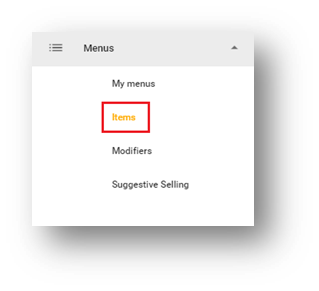
- Log in to your QikServe platform navigate to the **Menus** tab and select **Items -**
- Hover your mouse over the 3 dots of the item you wish to update and select the pencil icon (edit).
- You will then see the current information and under the **Price** will be the **Calories** section
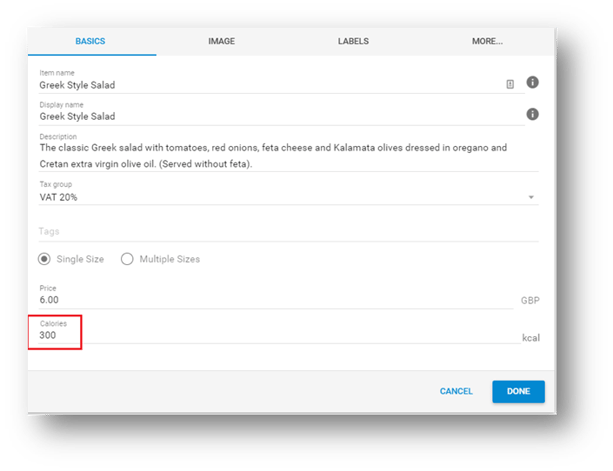
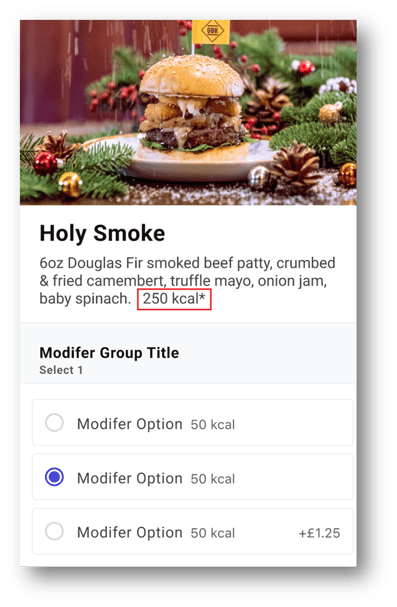
- Select **Done**. This calorie information will now be available on the item description when customers view/select your menu item.
**To your modifiers -**
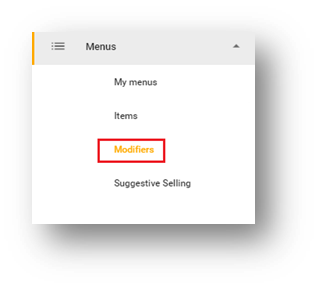
- Navigate to the **Menus** tab and select **Modifiers** -
- Hover your mouse over the 3 dots of the modifier you wish to update and select the pencil icon (edit).
- You will then see the current information and then calories in each option -
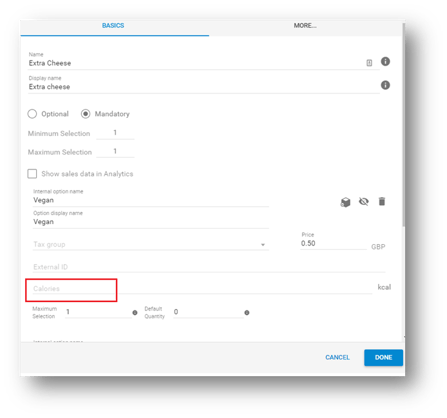
- Select done and the calorie information will appear on each modifier of items when customers go to select this -
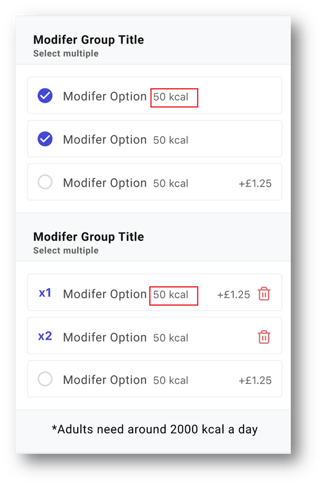
If you have our [Suggestive Selling](https://help.qikserve.com/knowledge/suggestive-selling?hsLang=en) feature enabled you will also be able to view the calories at this stage in the basket (see below image).
### Mobile App Version
For the configured calorie values to display in your mobile App, the App version must be 13.52 or above. If your App version is below this, calorie information **will not be displayed** in that environment. Please contact [support@qikserve.com](mailto:support@qikserve.com) to request mobile App resubmission for this feature to be enabled.
- [Product Updates](https://help.qikserve.com/migration/knowledge/product-updates?hsLang=en#main-content)
- [2024 Updates](https://help.qikserve.com/migration/knowledge/product-updates?hsLang=en#2024-updates)
- [2023 Updates](https://help.qikserve.com/migration/knowledge/product-updates?hsLang=en#2023-updates)
- [2022 Updates](https://help.qikserve.com/migration/knowledge/product-updates?hsLang=en#2022-updates)
- [2021 Updates](https://help.qikserve.com/migration/knowledge/product-updates?hsLang=en#2021-updates)
- [Getting Started & Support](https://help.qikserve.com/migration/knowledge/getting-started-support?hsLang=en#main-content)
- [Getting Started](https://help.qikserve.com/migration/knowledge/getting-started-support?hsLang=en#getting-started)
- [How To Use Support](https://help.qikserve.com/migration/knowledge/getting-started-support?hsLang=en#how-to-use-support)
- [Order Screen](https://help.qikserve.com/migration/knowledge/getting-started-support?hsLang=en#order-screen)
- [Services](https://help.qikserve.com/migration/knowledge/services?hsLang=en#main-content)
- [Analytics](https://help.qikserve.com/migration/knowledge/services?hsLang=en#analytics)
- [Store Settings](https://help.qikserve.com/migration/knowledge/services?hsLang=en#store-settings)
- [Tax](https://help.qikserve.com/migration/knowledge/services?hsLang=en#tax)
- [Outlets](https://help.qikserve.com/migration/knowledge/services?hsLang=en#outlets)
- [Collection or Delivery Service](https://help.qikserve.com/migration/knowledge/services?hsLang=en#collection-or-delivery-service)
- [To Seat Service](https://help.qikserve.com/migration/knowledge/services?hsLang=en#to-seat-service)
- [Global Dashboard](https://help.qikserve.com/migration/knowledge/services?hsLang=en#global-dashboard)
- [Custom Legal Documents](https://help.qikserve.com/migration/knowledge/services?hsLang=en#custom-legal-documents)
- [Styling](https://help.qikserve.com/migration/knowledge/services?hsLang=en#styling)
- [Manage Users](https://help.qikserve.com/migration/knowledge/services?hsLang=en#manage-users)
- [Events Services](https://help.qikserve.com/migration/knowledge/services?hsLang=en#events-services)
- [Payments](https://help.qikserve.com/migration/knowledge/payments?hsLang=en#main-content)
- [QikServe Payments](https://help.qikserve.com/migration/knowledge/payments?hsLang=en#qikserve-payments)
- [Toggle](https://help.qikserve.com/migration/knowledge/payments?hsLang=en#toggle)
- [Pennies](https://help.qikserve.com/migration/knowledge/payments?hsLang=en#pennies)
- [Menu Management](https://help.qikserve.com/migration/knowledge/menu-management?hsLang=en#main-content)
- [Items & Modifiers](https://help.qikserve.com/migration/knowledge/menu-management?hsLang=en#items-modifiers)
- [Menu Enhancement](https://help.qikserve.com/migration/knowledge/menu-management?hsLang=en#menu-enhancement)
- [Order Management](https://help.qikserve.com/migration/knowledge/order-management?hsLang=en#main-content)
- [The Expo Screen](https://help.qikserve.com/migration/knowledge/order-management?hsLang=en#the-expo-screen)
- [Hardware](https://help.qikserve.com/migration/knowledge/order-management?hsLang=en#hardware)
- [Orderlord](https://help.qikserve.com/migration/knowledge/order-management?hsLang=en#orderlord)
- [Twillio](https://help.qikserve.com/migration/knowledge/order-management?hsLang=en#twillio)
- [Loyalty](https://help.qikserve.com/migration/knowledge/loyalty?hsLang=en#main-content)
- [Loyalty Stamp Card](https://help.qikserve.com/migration/knowledge/loyalty?hsLang=en#loyalty-stamp-card)
- [Marketing](https://help.qikserve.com/migration/knowledge/loyalty?hsLang=en#marketing)
- [Talkbox](https://help.qikserve.com/migration/knowledge/loyalty?hsLang=en#talkbox)
- [Mobile Apps](https://help.qikserve.com/migration/knowledge/mobile-apps?hsLang=en#main-content)
- [App Store Developer Account](https://help.qikserve.com/migration/knowledge/mobile-apps?hsLang=en#app-store-developer-account)
- [App Communications](https://help.qikserve.com/migration/knowledge/mobile-apps?hsLang=en#app-communications)
- [Point Of Sale Integrations](https://help.qikserve.com/migration/knowledge/point-of-sale-integrations?hsLang=en#main-content)
- [Managing your POS Integration](https://help.qikserve.com/migration/knowledge/point-of-sale-integrations?hsLang=en#managing-your-pos-integration)
- [Access/IBS POS](https://help.qikserve.com/migration/knowledge/point-of-sale-integrations?hsLang=en#access-ibs-pos)
- [Bleep POS](https://help.qikserve.com/migration/knowledge/point-of-sale-integrations?hsLang=en#bleep-pos)
- [Centegra POS](https://help.qikserve.com/migration/knowledge/point-of-sale-integrations?hsLang=en#centegra-pos)
- [Deliverect POS](https://help.qikserve.com/migration/knowledge/point-of-sale-integrations?hsLang=en#deliverect-pos)
- [Datasym POS](https://help.qikserve.com/migration/knowledge/point-of-sale-integrations?hsLang=en#datasym-pos)
- [Epos Now POS](https://help.qikserve.com/migration/knowledge/point-of-sale-integrations?hsLang=en#epos-now-pos)
- [ICR POS](https://help.qikserve.com/migration/knowledge/point-of-sale-integrations?hsLang=en#icr-pos)
- [PixelPoint POS](https://help.qikserve.com/migration/knowledge/point-of-sale-integrations?hsLang=en#pixelpoint-pos)
- [Simphony Oracle POS](https://help.qikserve.com/migration/knowledge/point-of-sale-integrations?hsLang=en#simphony-oracle-pos)
- [Syrve/IIKO POS](https://help.qikserve.com/migration/knowledge/point-of-sale-integrations?hsLang=en#syrve-iiko-pos)
- [Tevalis POS](https://help.qikserve.com/migration/knowledge/point-of-sale-integrations?hsLang=en#tevalis-pos)
- [Zonal POS](https://help.qikserve.com/migration/knowledge/point-of-sale-integrations?hsLang=en#zonal-pos)
- [Toast POS](https://help.qikserve.com/migration/knowledge/point-of-sale-integrations?hsLang=en#toast-pos)
- [Open Check](https://help.qikserve.com/migration/knowledge/open-check?hsLang=en#main-content)
- [Guest Journey](https://help.qikserve.com/migration/knowledge/open-check?hsLang=en#guest-journey)
- [Troubleshooting](https://help.qikserve.com/migration/knowledge/open-check?hsLang=en#troubleshooting)
- [Pay At Table](https://help.qikserve.com/migration/knowledge/pay-at-table?hsLang=en#main-content)
- [Guest Journey](https://help.qikserve.com/migration/knowledge/pay-at-table?hsLang=en#guest-journey)
- [Troubleshooting](https://help.qikserve.com/migration/knowledge/pay-at-table?hsLang=en#troubleshooting)
- [Kiosks](https://help.qikserve.com/migration/knowledge/kiosks?hsLang=en#main-content)
- [New Menus & Updates](https://help.qikserve.com/migration/knowledge/kiosks?hsLang=en#new-menus-updates)
- [Troubleshooting](https://help.qikserve.com/migration/knowledge/kiosks?hsLang=en#troubleshooting)
[](https://help.qikserve.com/?hsLang=en)
QikServe Ltd.
Copyright © 2026, QikServe Ltd.