---
title: April 2021
description: See below features, improvements and bug fixes for the past month.
---
[Skip to content](https://help.qikserve.com/migration/knowledge/april-2021#main-content)
English
Show submenu for translations
![QikServe-Access-RGB-Blue-less-padding-knowledge-base.png\]](https://help.qikserve.com/hs-fs/hubfs/QikServe-Access-RGB-Blue-less-padding-knowledge-base.png?height=40&name=QikServe-Access-RGB-Blue-less-padding-knowledge-base.png)
Open main navigation
Close main navigation
- English
Show submenu for translations
- Visit QikServe.com
Visit QikServe.com
Welcome to our Knowledge Base, do you have a question?
- There are no suggestions because the search field is empty.
1. [Knowledge Base](https://help.qikserve.com/migration/knowledge?hsLang=en)
2. [Product Updates](https://help.qikserve.com/migration/knowledge/product-updates?hsLang=en)
3. [2021 Updates](https://help.qikserve.com/migration/knowledge/product-updates?hsLang=en#2021-updates)
# April 2021
## See below features, improvements and bug fixes for the past month.
### New Features
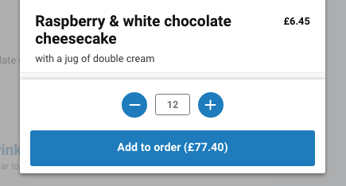
- Enter item quantity when adding an item to basket
- If you cater to large audiences this will allow your customers to easily enter the number of people that they are are ordering for
- If a customer is ordering for an office, instead of clicking the + button they can now enter the number digits when adding the item to basket, or when editing the basket
Item level instructions
- Add a customer facing text box onto an item, prompting a customer to leave any special notes when they are ordering
.png?width=290&height=400&name=Screenshot%202021-05-03%20at%2015.14.38%20(1).png)
- From your Dashboard find and edit the appropriate menu item, ticking the ‘Special Instructions available’ box before saving
- The text box is a default is set as 60 characters but it can be amended upon request. It will show up in the Orders Screen and we are working on getting it compatible with all outbound POS integrations
- SSO pages and functionality
- - With all Single Sign On 3rd party apps we now show the Contact Page and My Account page, which includes useful things like past addresses and orders. We do not show the account password settings as this comes from the SSO
- We also now show the item search functionality on the menu page
### Improvements
- Update the default Terms & Conditions and Privacy Policy
- Shown to the customer when they create an account on your Expo ordering page
- If you are displaying your own T&Cs and PP you will not have been affected by the change
- Update Delivery address fields on Web orders
- We have added new address fields: Building name & Flat number
- Searching address is managed by Google Maps autocomplete service
- Thepostcode field is required for Canada, Finland, Ireland, GB and USA
- The “Save address for future orders” box will be checked as default
- Custom Outlet fields
- If you need to gather data from a customer before they checkout, such as what their car registration number is for Curbside collection, then you can use Custom Fields at checkout. See [minute 1:45 on this video for setup](https://qikserve.atlassian.net/wiki/spaces/MOP/pages/1705213953)
- Previously this was mandatory and is now optional (assigned during creation) and will get sent through to Oracle RES and SIM2 integrated POS
### Bug Fixes
- When setting up [To Seat service](https://3373248.hs-sites.com/knowledge/to-seat-service?hsLang=en) you can tick the checkbox to ‘Accept free text’ allowing the customer to type their table number rather than select it from a list. A bug was fixed to allow this to function as intended for single Outlet location stores
- Unable to view nested sections if menu items are in main section
- Unable to reset passwords on US platform
- [Product Updates](https://help.qikserve.com/migration/knowledge/product-updates?hsLang=en#main-content)
- [2024 Updates](https://help.qikserve.com/migration/knowledge/product-updates?hsLang=en#2024-updates)
- [2023 Updates](https://help.qikserve.com/migration/knowledge/product-updates?hsLang=en#2023-updates)
- [2022 Updates](https://help.qikserve.com/migration/knowledge/product-updates?hsLang=en#2022-updates)
- [2021 Updates](https://help.qikserve.com/migration/knowledge/product-updates?hsLang=en#2021-updates)
- [Getting Started & Support](https://help.qikserve.com/migration/knowledge/getting-started-support?hsLang=en#main-content)
- [Getting Started](https://help.qikserve.com/migration/knowledge/getting-started-support?hsLang=en#getting-started)
- [How To Use Support](https://help.qikserve.com/migration/knowledge/getting-started-support?hsLang=en#how-to-use-support)
- [Order Screen](https://help.qikserve.com/migration/knowledge/getting-started-support?hsLang=en#order-screen)
- [Services](https://help.qikserve.com/migration/knowledge/services?hsLang=en#main-content)
- [Analytics](https://help.qikserve.com/migration/knowledge/services?hsLang=en#analytics)
- [Store Settings](https://help.qikserve.com/migration/knowledge/services?hsLang=en#store-settings)
- [Tax](https://help.qikserve.com/migration/knowledge/services?hsLang=en#tax)
- [Outlets](https://help.qikserve.com/migration/knowledge/services?hsLang=en#outlets)
- [Collection or Delivery Service](https://help.qikserve.com/migration/knowledge/services?hsLang=en#collection-or-delivery-service)
- [To Seat Service](https://help.qikserve.com/migration/knowledge/services?hsLang=en#to-seat-service)
- [Global Dashboard](https://help.qikserve.com/migration/knowledge/services?hsLang=en#global-dashboard)
- [Custom Legal Documents](https://help.qikserve.com/migration/knowledge/services?hsLang=en#custom-legal-documents)
- [Styling](https://help.qikserve.com/migration/knowledge/services?hsLang=en#styling)
- [Manage Users](https://help.qikserve.com/migration/knowledge/services?hsLang=en#manage-users)
- [Events Services](https://help.qikserve.com/migration/knowledge/services?hsLang=en#events-services)
- [Payments](https://help.qikserve.com/migration/knowledge/payments?hsLang=en#main-content)
- [QikServe Payments](https://help.qikserve.com/migration/knowledge/payments?hsLang=en#qikserve-payments)
- [Toggle](https://help.qikserve.com/migration/knowledge/payments?hsLang=en#toggle)
- [Pennies](https://help.qikserve.com/migration/knowledge/payments?hsLang=en#pennies)
- [Menu Management](https://help.qikserve.com/migration/knowledge/menu-management?hsLang=en#main-content)
- [Items & Modifiers](https://help.qikserve.com/migration/knowledge/menu-management?hsLang=en#items-modifiers)
- [Menu Enhancement](https://help.qikserve.com/migration/knowledge/menu-management?hsLang=en#menu-enhancement)
- [Order Management](https://help.qikserve.com/migration/knowledge/order-management?hsLang=en#main-content)
- [The Expo Screen](https://help.qikserve.com/migration/knowledge/order-management?hsLang=en#the-expo-screen)
- [Hardware](https://help.qikserve.com/migration/knowledge/order-management?hsLang=en#hardware)
- [Orderlord](https://help.qikserve.com/migration/knowledge/order-management?hsLang=en#orderlord)
- [Twillio](https://help.qikserve.com/migration/knowledge/order-management?hsLang=en#twillio)
- [Loyalty](https://help.qikserve.com/migration/knowledge/loyalty?hsLang=en#main-content)
- [Loyalty Stamp Card](https://help.qikserve.com/migration/knowledge/loyalty?hsLang=en#loyalty-stamp-card)
- [Marketing](https://help.qikserve.com/migration/knowledge/loyalty?hsLang=en#marketing)
- [Talkbox](https://help.qikserve.com/migration/knowledge/loyalty?hsLang=en#talkbox)
- [Mobile Apps](https://help.qikserve.com/migration/knowledge/mobile-apps?hsLang=en#main-content)
- [App Store Developer Account](https://help.qikserve.com/migration/knowledge/mobile-apps?hsLang=en#app-store-developer-account)
- [App Communications](https://help.qikserve.com/migration/knowledge/mobile-apps?hsLang=en#app-communications)
- [Point Of Sale Integrations](https://help.qikserve.com/migration/knowledge/point-of-sale-integrations?hsLang=en#main-content)
- [Managing your POS Integration](https://help.qikserve.com/migration/knowledge/point-of-sale-integrations?hsLang=en#managing-your-pos-integration)
- [Access/IBS POS](https://help.qikserve.com/migration/knowledge/point-of-sale-integrations?hsLang=en#access-ibs-pos)
- [Bleep POS](https://help.qikserve.com/migration/knowledge/point-of-sale-integrations?hsLang=en#bleep-pos)
- [Centegra POS](https://help.qikserve.com/migration/knowledge/point-of-sale-integrations?hsLang=en#centegra-pos)
- [Deliverect POS](https://help.qikserve.com/migration/knowledge/point-of-sale-integrations?hsLang=en#deliverect-pos)
- [Datasym POS](https://help.qikserve.com/migration/knowledge/point-of-sale-integrations?hsLang=en#datasym-pos)
- [Epos Now POS](https://help.qikserve.com/migration/knowledge/point-of-sale-integrations?hsLang=en#epos-now-pos)
- [ICR POS](https://help.qikserve.com/migration/knowledge/point-of-sale-integrations?hsLang=en#icr-pos)
- [PixelPoint POS](https://help.qikserve.com/migration/knowledge/point-of-sale-integrations?hsLang=en#pixelpoint-pos)
- [Simphony Oracle POS](https://help.qikserve.com/migration/knowledge/point-of-sale-integrations?hsLang=en#simphony-oracle-pos)
- [Syrve/IIKO POS](https://help.qikserve.com/migration/knowledge/point-of-sale-integrations?hsLang=en#syrve-iiko-pos)
- [Tevalis POS](https://help.qikserve.com/migration/knowledge/point-of-sale-integrations?hsLang=en#tevalis-pos)
- [Zonal POS](https://help.qikserve.com/migration/knowledge/point-of-sale-integrations?hsLang=en#zonal-pos)
- [Toast POS](https://help.qikserve.com/migration/knowledge/point-of-sale-integrations?hsLang=en#toast-pos)
- [Open Check](https://help.qikserve.com/migration/knowledge/open-check?hsLang=en#main-content)
- [Guest Journey](https://help.qikserve.com/migration/knowledge/open-check?hsLang=en#guest-journey)
- [Troubleshooting](https://help.qikserve.com/migration/knowledge/open-check?hsLang=en#troubleshooting)
- [Pay At Table](https://help.qikserve.com/migration/knowledge/pay-at-table?hsLang=en#main-content)
- [Guest Journey](https://help.qikserve.com/migration/knowledge/pay-at-table?hsLang=en#guest-journey)
- [Troubleshooting](https://help.qikserve.com/migration/knowledge/pay-at-table?hsLang=en#troubleshooting)
- [Kiosks](https://help.qikserve.com/migration/knowledge/kiosks?hsLang=en#main-content)
- [New Menus & Updates](https://help.qikserve.com/migration/knowledge/kiosks?hsLang=en#new-menus-updates)
- [Troubleshooting](https://help.qikserve.com/migration/knowledge/kiosks?hsLang=en#troubleshooting)
[](https://help.qikserve.com/?hsLang=en)
QikServe Ltd.
Copyright © 2026, QikServe Ltd.