---
title: Add Tips or Fees to an order
description: Our system provides the ability to add service charges (mandatory) or tips (optional) to orders.
---
[Skip to content](https://help.qikserve.com/migration/knowledge/adding-tips-or-fees-to-an-order#main-content)
English
Show submenu for translations
![QikServe-Access-RGB-Blue-less-padding-knowledge-base.png\]](https://help.qikserve.com/hs-fs/hubfs/QikServe-Access-RGB-Blue-less-padding-knowledge-base.png?height=40&name=QikServe-Access-RGB-Blue-less-padding-knowledge-base.png)
Open main navigation
Close main navigation
- English
Show submenu for translations
- Visit QikServe.com
Visit QikServe.com
Welcome to our Knowledge Base, do you have a question?
- There are no suggestions because the search field is empty.
1. [Knowledge Base](https://help.qikserve.com/migration/knowledge?hsLang=en)
2. [Menu Management](https://help.qikserve.com/migration/knowledge/menu-management?hsLang=en)
3. [Menu Enhancement](https://help.qikserve.com/migration/knowledge/menu-management?hsLang=en#menu-enhancement)
# Add Tips or Fees to an order
## Our system provides the ability to add service charges (mandatory) or tips (optional) to orders.
Tips and Service Charges are currently configured from the QikServe side - please contact us at [support@qikserve.com](mailto:support@qikserve.com) to have this enabled for your store.
### Tips
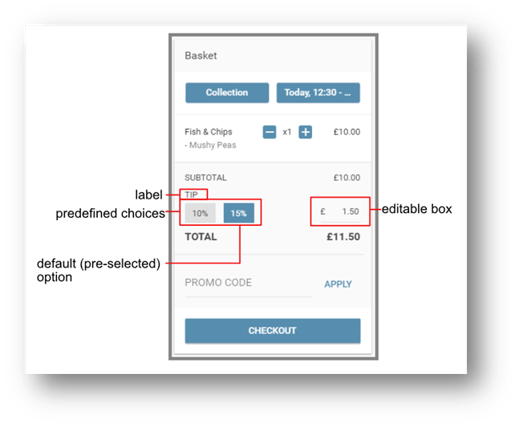
Tips are **OPTIONAL** - a customer can remove or change the value of tips
To add tips to your store, we need the following details:
- The label to be displayed to the customer (e.g. “Tips”, “Gratuity” etc)
- Whether the tips should be applied to all orders, or only to a specific service (e.g. Delivery)
- Tip suggested values - these appear as clickable values that customers can select between, but they can always manually type in the value as well.
- At least 1 suggested / predefined value is required.
- Suggested values can be a set amount (e.g. £1.00) or a percentage (e.g. 10%).
- Sub-percentage values are not supported for tips - 10% is valid, but 9.5% is not.
- OPTIONAL - default tip choice - this allows you to pre-select one of the suggested options, so the customer would have to actively edit the tip to alter / remove it.
### How it looks for the customer:
### Fees
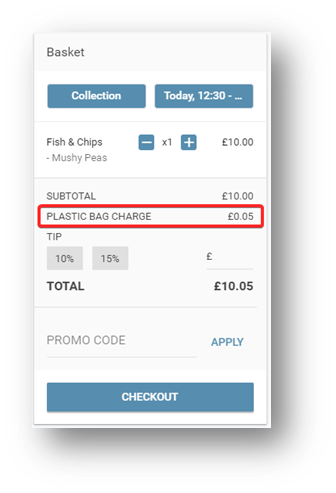
Fees are **MANDATORY** - they get applied automatically and there is no way for customers to remove them.
Fees don't require (or indeed accept) any interaction from the customer.
Much like tips, they require a few details:
- The label displayed to the customer.
- The amount, either as a set value or percentage.
- Unlike with tips, for service charges we do support fractions of a percentage point.
- Whether the fee should apply to all services, or only a specific one.
- Whether the fee should apply to all payment methods, or only a specific one.
- OPTIONAL - The start and end date for the fee to apply.
- OPTIONAL - Max basket value - for values above it, the fee would be waived.
- OPTIONAL - Tax group - if you would like to calculate tax for the fee, let us know which of your tax groups should apply to it.
#### How it looks for the customer:
#### Reporting
Tips and Fees are both visible in the “**Orders**” report of our “**Analytics**” section, and are reported separately. Please keep in mind that the service charges discussed in this article and delivery charges configured in the dashboard for delivery zones are both reported in the “**fees**” column
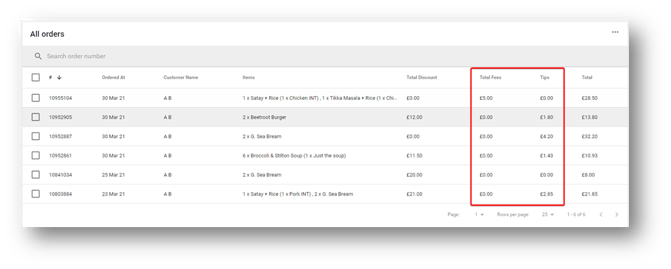
All analytics reports can be exported as a CSV file for further processing - more details can be found in the dedicated article - [Export Data from your Dashboard](https://help.qikserve.com/knowledge/analytics?hsLang=en)
- [Product Updates](https://help.qikserve.com/migration/knowledge/product-updates?hsLang=en#main-content)
- [2024 Updates](https://help.qikserve.com/migration/knowledge/product-updates?hsLang=en#2024-updates)
- [2023 Updates](https://help.qikserve.com/migration/knowledge/product-updates?hsLang=en#2023-updates)
- [2022 Updates](https://help.qikserve.com/migration/knowledge/product-updates?hsLang=en#2022-updates)
- [2021 Updates](https://help.qikserve.com/migration/knowledge/product-updates?hsLang=en#2021-updates)
- [Getting Started & Support](https://help.qikserve.com/migration/knowledge/getting-started-support?hsLang=en#main-content)
- [Getting Started](https://help.qikserve.com/migration/knowledge/getting-started-support?hsLang=en#getting-started)
- [How To Use Support](https://help.qikserve.com/migration/knowledge/getting-started-support?hsLang=en#how-to-use-support)
- [Order Screen](https://help.qikserve.com/migration/knowledge/getting-started-support?hsLang=en#order-screen)
- [Services](https://help.qikserve.com/migration/knowledge/services?hsLang=en#main-content)
- [Analytics](https://help.qikserve.com/migration/knowledge/services?hsLang=en#analytics)
- [Store Settings](https://help.qikserve.com/migration/knowledge/services?hsLang=en#store-settings)
- [Tax](https://help.qikserve.com/migration/knowledge/services?hsLang=en#tax)
- [Outlets](https://help.qikserve.com/migration/knowledge/services?hsLang=en#outlets)
- [Collection or Delivery Service](https://help.qikserve.com/migration/knowledge/services?hsLang=en#collection-or-delivery-service)
- [To Seat Service](https://help.qikserve.com/migration/knowledge/services?hsLang=en#to-seat-service)
- [Global Dashboard](https://help.qikserve.com/migration/knowledge/services?hsLang=en#global-dashboard)
- [Custom Legal Documents](https://help.qikserve.com/migration/knowledge/services?hsLang=en#custom-legal-documents)
- [Styling](https://help.qikserve.com/migration/knowledge/services?hsLang=en#styling)
- [Manage Users](https://help.qikserve.com/migration/knowledge/services?hsLang=en#manage-users)
- [Events Services](https://help.qikserve.com/migration/knowledge/services?hsLang=en#events-services)
- [Payments](https://help.qikserve.com/migration/knowledge/payments?hsLang=en#main-content)
- [QikServe Payments](https://help.qikserve.com/migration/knowledge/payments?hsLang=en#qikserve-payments)
- [Toggle](https://help.qikserve.com/migration/knowledge/payments?hsLang=en#toggle)
- [Pennies](https://help.qikserve.com/migration/knowledge/payments?hsLang=en#pennies)
- [Menu Management](https://help.qikserve.com/migration/knowledge/menu-management?hsLang=en#main-content)
- [Items & Modifiers](https://help.qikserve.com/migration/knowledge/menu-management?hsLang=en#items-modifiers)
- [Menu Enhancement](https://help.qikserve.com/migration/knowledge/menu-management?hsLang=en#menu-enhancement)
- [Order Management](https://help.qikserve.com/migration/knowledge/order-management?hsLang=en#main-content)
- [The Expo Screen](https://help.qikserve.com/migration/knowledge/order-management?hsLang=en#the-expo-screen)
- [Hardware](https://help.qikserve.com/migration/knowledge/order-management?hsLang=en#hardware)
- [Orderlord](https://help.qikserve.com/migration/knowledge/order-management?hsLang=en#orderlord)
- [Twillio](https://help.qikserve.com/migration/knowledge/order-management?hsLang=en#twillio)
- [Loyalty](https://help.qikserve.com/migration/knowledge/loyalty?hsLang=en#main-content)
- [Loyalty Stamp Card](https://help.qikserve.com/migration/knowledge/loyalty?hsLang=en#loyalty-stamp-card)
- [Marketing](https://help.qikserve.com/migration/knowledge/loyalty?hsLang=en#marketing)
- [Talkbox](https://help.qikserve.com/migration/knowledge/loyalty?hsLang=en#talkbox)
- [Mobile Apps](https://help.qikserve.com/migration/knowledge/mobile-apps?hsLang=en#main-content)
- [App Store Developer Account](https://help.qikserve.com/migration/knowledge/mobile-apps?hsLang=en#app-store-developer-account)
- [App Communications](https://help.qikserve.com/migration/knowledge/mobile-apps?hsLang=en#app-communications)
- [Point Of Sale Integrations](https://help.qikserve.com/migration/knowledge/point-of-sale-integrations?hsLang=en#main-content)
- [Managing your POS Integration](https://help.qikserve.com/migration/knowledge/point-of-sale-integrations?hsLang=en#managing-your-pos-integration)
- [Access/IBS POS](https://help.qikserve.com/migration/knowledge/point-of-sale-integrations?hsLang=en#access-ibs-pos)
- [Bleep POS](https://help.qikserve.com/migration/knowledge/point-of-sale-integrations?hsLang=en#bleep-pos)
- [Centegra POS](https://help.qikserve.com/migration/knowledge/point-of-sale-integrations?hsLang=en#centegra-pos)
- [Deliverect POS](https://help.qikserve.com/migration/knowledge/point-of-sale-integrations?hsLang=en#deliverect-pos)
- [Datasym POS](https://help.qikserve.com/migration/knowledge/point-of-sale-integrations?hsLang=en#datasym-pos)
- [Epos Now POS](https://help.qikserve.com/migration/knowledge/point-of-sale-integrations?hsLang=en#epos-now-pos)
- [ICR POS](https://help.qikserve.com/migration/knowledge/point-of-sale-integrations?hsLang=en#icr-pos)
- [PixelPoint POS](https://help.qikserve.com/migration/knowledge/point-of-sale-integrations?hsLang=en#pixelpoint-pos)
- [Simphony Oracle POS](https://help.qikserve.com/migration/knowledge/point-of-sale-integrations?hsLang=en#simphony-oracle-pos)
- [Syrve/IIKO POS](https://help.qikserve.com/migration/knowledge/point-of-sale-integrations?hsLang=en#syrve-iiko-pos)
- [Tevalis POS](https://help.qikserve.com/migration/knowledge/point-of-sale-integrations?hsLang=en#tevalis-pos)
- [Zonal POS](https://help.qikserve.com/migration/knowledge/point-of-sale-integrations?hsLang=en#zonal-pos)
- [Toast POS](https://help.qikserve.com/migration/knowledge/point-of-sale-integrations?hsLang=en#toast-pos)
- [Open Check](https://help.qikserve.com/migration/knowledge/open-check?hsLang=en#main-content)
- [Guest Journey](https://help.qikserve.com/migration/knowledge/open-check?hsLang=en#guest-journey)
- [Troubleshooting](https://help.qikserve.com/migration/knowledge/open-check?hsLang=en#troubleshooting)
- [Pay At Table](https://help.qikserve.com/migration/knowledge/pay-at-table?hsLang=en#main-content)
- [Guest Journey](https://help.qikserve.com/migration/knowledge/pay-at-table?hsLang=en#guest-journey)
- [Troubleshooting](https://help.qikserve.com/migration/knowledge/pay-at-table?hsLang=en#troubleshooting)
- [Kiosks](https://help.qikserve.com/migration/knowledge/kiosks?hsLang=en#main-content)
- [New Menus & Updates](https://help.qikserve.com/migration/knowledge/kiosks?hsLang=en#new-menus-updates)
- [Troubleshooting](https://help.qikserve.com/migration/knowledge/kiosks?hsLang=en#troubleshooting)
[](https://help.qikserve.com/?hsLang=en)
QikServe Ltd.
Copyright © 2026, QikServe Ltd.